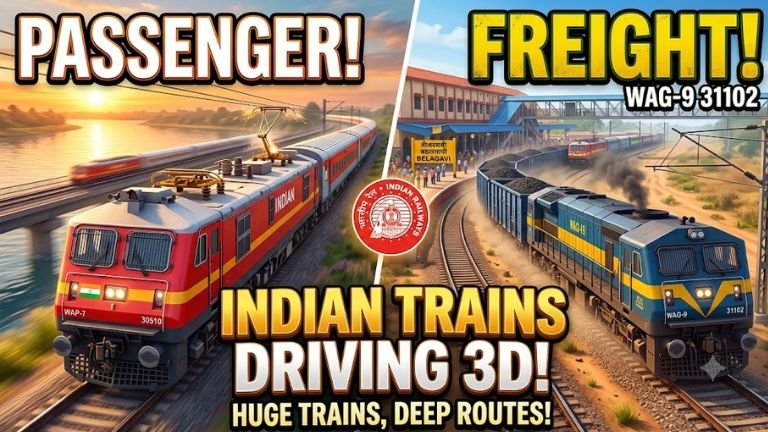
Indian Trains Driving 3D captures the specific, massive charm of the Indian Railways network. Whether it is navigating the heavy industrial engines across rural landscapes or sliding an express train into a jam-packed, tea-stall-lined platform, the game attempts to bring the massive scale of the Indian rail system straight to your mobile screen.
This comprehensive guide breaks down everything from core gameplay mechanics and train types to advanced routing strategies and optimization tips.
1. Core Gameplay Mechanics & Controls
Unlike casual racing titles, driving a 15,000-ton train requires an understanding of physics, momentum, and signaling systems. The basic controls are built to mimic real locomotive operations:
- The Throttle / Notch Controller: This determines the power applied to the traction motors. You don’t just hold down an “accelerate” button. You notch up to build speed gradually and notch down well before you want to stop to let the train coast.
- The Braking Systems: Trains utilize multiple braking mechanisms. The game models Independent Brakes (which apply friction only to the locomotive engine) and Train/Automatic Brakes (which apply air-brake pressure across every single passenger or freight car attached behind you).
- The Track-Switching Switch: When approaching major junctions, a timely track toggle path determines whether you take the express route or head into a loop line to wait for another train to pass.
Handling Stopping Distances
The biggest mistake new players make is slamming the brakes too late. A fully loaded freight rake travelling at 90 km/h requires hundreds of meters of clear track to come to a complete standstill.
Rule of Thumb: Begin your braking profile at least 1.5 to 2 kilometers away from your scheduled station stop or an oncoming red signal to avoid catastrophic overshoot penalties.
2. Locomotives and Rakes Available
The game features a roster modeled directly after actual rolling stock found across various Indian zones:
Electric Passenger Locomotives
- WAP-7: The absolute workhorse of high-speed passenger corridors across India. It handles long-distance premium rakes effortlessly and provides quick acceleration curves.
- WAP-4: An older but incredibly reliable classic electric engine, known for hauling standard passenger trains with its distinctive bright red paint scheme.
Freight Heavy-Haulers
- WAG-9: The ultimate heavy-duty electric locomotive designed purely for high-tractive effort. It is slow to accelerate but maintains solid stability when pulling dense chains of cargo wagons over steep gradients.
Coach Variations
The game allows players to pair these engines with several iconic coach types:
- LHB Coaches: The modern red-and-silver high-speed coaches used in Rajdhani and Shatabdi expresses, offering superior stability at top speeds.
- ICF Blue Coaches: The nostalgic, classic blue passenger cars that form the backbone of regional express journeys across rural sectors.
- Double Decker & Garib Rath Coaches: Distinctive high-capacity rakes that challenge your braking timings due to different weight distributions.
- Freight Wagons (BOXN, BTPN): Deep-sided open wagons for coal/ore or cylindrical tankers for oil distribution that add significant mass to your train.
3. Mastering the Signaling System
You cannot drive successfully without respecting the trackside signal lights. The game relies on a color-coded warning architecture:
| Signal Color | Visual Indication | Required Action |
| Green | Clear Track | Proceed at the maximum permissible speed for that section. |
| Double Yellow | Attention | Prepare to reduce speed; the next signal is likely showing a single yellow. |
| Single Yellow | Caution | Drop your speed to under 40 km/h; the very next signal is absolutely Red. |
| Red | Danger / Stop | Bring the train to a complete halt before the signal post to avoid failing the mission. |
4. Operational Modes Breakdown
The simulation gameplay is split across three distinct modes designed for different styles of play:
Story / Campaign Mode
This mode places you in the shoes of a newly appointed loco pilot. You start with short regional milk-runs and gradually unlock high-tier express permissions. Scenarios include managing tight holiday rush hours, navigating sudden monsoon downpours with reduced track traction, and coping with sudden route diversions due to track maintenance work.
Custom Sandbox Mode
For purists who want complete control. You select your starting junction, choose your destination terminal, assemble your custom rake combination (e.g., a WAG-9 pulling passenger cars just for fun), and set the time of day and dynamic weather parameters.
Challenge Mode
Designed to test precise handling limits. You might be tasked with running a 24-coach rake through a mountain pass with broken signaling, requiring you to drive purely by sight and keep speeds low.
5. Pro Optimization Tips for Smooth Running
- Manage Phone Thermal Limits: 3D simulators can draw heavy processing power. If you experience micro-stutters during busy station arrivals, lower the shadow resolution in settings or switch to the “Lite” graphics profile to maintain a stable 60 FPS frame rate.
- Listen to the Horn Rules: Use the dual-tone horn system when approaching un-gated level crossings, entering tunnels, or passing stationary trains on adjacent lines to earn maximum operational accuracy points.
- The Secret to Perfect Station Stops: Don’t keep the brakes applied fully until the train stops. Slide your brake pressure down to about 10% right as the speedometer hits 5 km/h. This prevents an aggressive jerk, giving your virtual passengers a completely smooth platform arrival.
Note: If you are looking for cheat codes to spawn sports cars, dinosaurs, or helicopters on the tracks, you are likely thinking of its sister open-world game, Indian Bikes Driving 3D (where codes like 4040 spawn a tank, 9191 spawns a Thar, and 0 changes vehicles to monster trucks). In this dedicated train simulator, your ultimate reward is mastering the true schedules and rails of the Indian sub-continent!