Mobile Recharge Cashback App: How to Use It on Your Mobile and Get Cashback free
Mobile recharge has become a regular expense for almost every smartphone user. Whether you use Jio, Airtel, Vi, BSNL, or another supported operator, you usually need to recharge your prepaid number regularly. But what if you could complete the same recharge through an app and receive cashback, rewards, or discounts?
That is where mobile recharge cashback apps come into the picture.
A recharge cashback app allows users to recharge their mobile numbers through an app and, when an eligible offer is available, receive cashback or another reward after completing the transaction. Some apps also support DTH, electricity bills, FASTag, broadband, gas, insurance and other payments.
There are many different cashback apps available, and their offers are not identical. For example, some current apps advertise cashback or rewards on eligible mobile recharges, while telecom operators also publish separate partner-app offers.
This article explains how to use a mobile recharge cashback app on your smartphone, how cashback works, how to check an offer, how to complete a recharge, and what precautions you should take before using such apps.
What Is a Mobile Recharge Cashback App?
A mobile recharge cashback app is an application that lets you recharge a mobile number and may provide a reward for eligible transactions.
The basic process is simple:
- Download a supported recharge app.
- Register or log in.
- Enter the mobile number.
- Select the operator.
- Choose a recharge plan.
- Check available cashback or promotional offers.
- Make the payment.
- Receive the recharge.
- Check whether the cashback has been credited.
The cashback may appear in different forms depending on the app. It could be wallet cashback, reward points, a voucher, a discount, or another promotional benefit.
For example, Jio’s current August 2026 cashback page lists partner-app offers where rewards can be provided as brand vouchers, cashback, or reward points depending on the platform and offer terms.
Therefore, it is important not to assume that every recharge automatically gives cash directly into your bank account.
How Does Mobile Recharge Cashback Work?
Cashback generally works through promotional offers.
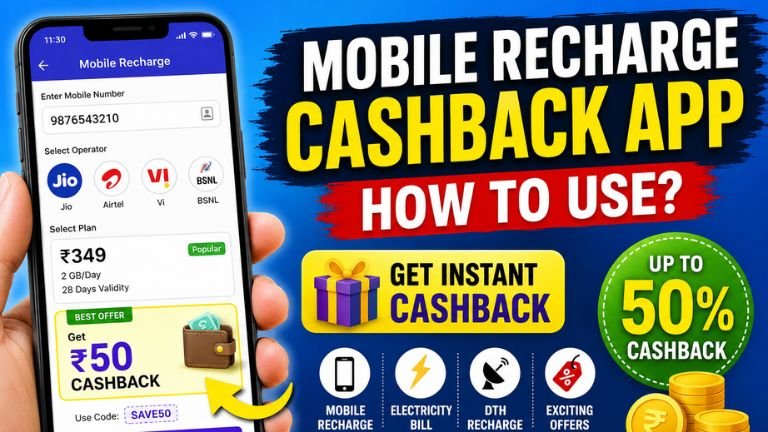
Suppose you need to recharge your phone with ₹349. You open a cashback-enabled app and find an offer stating that an eligible recharge can receive a reward.
You complete the recharge through the specified payment method. After the transaction is successful, the app checks whether the transaction satisfies the offer conditions.
If everything matches, the reward is credited according to the offer’s terms.
For example, an offer may require:
- A minimum recharge amount
- A specific mobile operator
- A particular payment method
- A specific promo code
- New-user status
- A particular number of transactions
- A specific offer period
This means you should always read the offer conditions before paying.
Step 1: Download the Cashback Recharge App
First, open the official app store on your Android or iPhone.
Search for the exact name of the recharge application you want to use.
For Android users, check the Google Play Store listing carefully. Look at:
- Developer name
- Number of downloads
- Recent update date
- User reviews
- Privacy information
- Support details
- Permissions requested by the app
For example, several current recharge apps advertise mobile recharge cashback and bill-payment services on Google Play.
Do not install an unknown APK simply because someone sends you a download link through WhatsApp or Telegram.
Using the official app store or the service’s official website is generally the safer approach.
Step 2: Open the App and Register
After installing the app, open it.
Most recharge applications require you to create an account or verify your mobile number.
The registration process may ask for:
- Mobile number
- Name
- Email address
- OTP
- Password or PIN
- Other basic information
Enter the information carefully.
If an app asks for unnecessary permissions or highly sensitive information, stop and investigate before proceeding.
Step 3: Log In to Your Account
After registration, log in using the credentials or OTP requested by the application.
You should then reach the app’s main dashboard.
Look for an option such as:
Mobile Recharge, Recharge, Prepaid Recharge, or Bill Payments.
The exact name and design can differ from one app to another.
Step 4: Select Mobile Recharge
Tap the Mobile Recharge option.
You will normally see a screen asking for the mobile number and operator.
Enter the number that you want to recharge.
This is one of the most important steps because entering the wrong number can result in the recharge being applied to another person’s account.
Before making payment, check the mobile number carefully.
Step 5: Select Your Mobile Operator
Select your mobile network operator.
Common operators in India include:
- Jio
- Airtel
- Vi
- BSNL
Some applications support additional operators or services. Current recharge applications advertise support for major operators including Jio, Airtel, Vi and BSNL.
If the app automatically detects the operator, still verify that the information is correct.
Step 6: Choose Your Recharge Plan
After selecting the operator, choose your recharge plan.
Depending on the app, you may be able to browse:
- Unlimited plans
- Data plans
- Talktime plans
- Validity plans
- Monthly plans
- Other operator-specific plans
Select the plan that suits your needs.
Do not select a plan just because it has a higher cashback amount.
The actual recharge benefit should be your first priority.
Step 7: Check Cashback Offers Before Paying
This is the most important step if your main purpose is to save money.
Before making the payment, look for sections such as:
Offers
Cashback
Rewards
Coupons
Promo Code
Rewards & Benefits
Read the conditions carefully.
For example, an offer might say that a reward is available only for a recharge above a particular amount or only for selected users.
Jio’s current partner-offer page demonstrates why checking the conditions matters: its listed offers specify things such as minimum recharge values, user type, number of eligible recharges and the form in which rewards are provided.
Step 8: Apply a Promo Code If Required
Some cashback offers require a promo code.
If the app provides a coupon or promotional code, enter it before completing payment.
Then check whether the discount or cashback offer has been successfully applied.
If the app says the coupon is invalid, do not assume that cashback will still be provided.
Read the offer conditions and correct the issue before paying.
Step 9: Select Your Payment Method
After selecting the recharge plan, choose your payment method.
Depending on the application, available options may include:
- UPI
- Debit card
- Credit card
- Net banking
- Wallet
- Other supported payment methods
Some recharge apps advertise multiple payment methods, including UPI, cards and net banking.
Choose a payment method you trust.
Before confirming, check the final amount shown on the payment screen.
Step 10: Complete the Payment
Confirm the payment using your UPI PIN, card authentication, OTP or other required security method.
Never share your:
- UPI PIN
- ATM PIN
- Card PIN
- Password
- OTP
with another person.
A legitimate payment process should not require you to reveal your confidential payment PIN to customer-support staff or another individual.
Step 11: Check Recharge Confirmation
After successful payment, the app should display a transaction result.
Usually, you will see information such as:
- Transaction ID
- Recharge amount
- Mobile number
- Operator
- Date and time
- Transaction status
Take a screenshot or save the transaction ID if necessary.
If the recharge is successful, the plan should be activated according to the operator’s processing time.
Step 12: Check Your Cashback
Now open the app’s:
Wallet, Cashback, Rewards, or Transaction History section.
Check whether the promised reward has been credited.
Some cashback may be instant, while other promotional rewards may be credited later according to the terms.
Do not assume that the cashback is missing simply because it does not appear immediately.
First check the offer’s stated credit time.
Jio’s current FAQ explains that applicable rewards are provided by the relevant platform after a successful eligible recharge according to that platform’s terms and conditions.
How to Use Cashback
The way cashback can be used depends entirely on the application.
Some apps may allow cashback to be:
- Used for another recharge
- Used for bill payments
- Redeemed through an available withdrawal option
- Converted into rewards
- Used against eligible purchases
Other apps may provide vouchers or reward points rather than withdrawable cash.
Therefore, always check the app’s Cashback Terms or Rewards Terms.
Do not assume that “cashback” automatically means money that can be transferred directly to your bank account.
Example: How a Cashback Recharge Works
Imagine you need a ₹349 mobile recharge.
You open the cashback app and find an eligible offer.
The process could look like this:
Recharge amount: ₹349
Cashback/reward: According to the applicable offer
Payment: UPI
Transaction: Successful
Reward: Credited according to the offer conditions
The actual reward could be different depending on the app, user account, operator, payment method and promotional period.
For this reason, the amount advertised in an offer should not be treated as a guaranteed reward for every transaction.
Can You Get Cashback Every Time?
Not necessarily.
This is an important point.
Many applications advertise phrases such as “up to X% cashback” or “cashback on eligible transactions.”
“Up to” does not mean that every user will receive the maximum amount.
The actual reward can depend on:
- Operator
- Recharge amount
- User eligibility
- Offer period
- Payment method
- Promo code
- Previous transactions
- Daily or monthly limits
- App-specific conditions
For example, current cashback applications advertise different reward percentages and conditions, while Jio’s partner offers have their own separate eligibility rules.
Always consider the actual terms instead of relying only on promotional headlines.
How to Get More Cashback
If you regularly recharge your phone, you can improve your chances of receiving useful offers by following a few simple habits.
Check Offers Before Every Recharge
Offers can change frequently.
Do not assume that the same cashback offer will remain available next month.
Compare Different Payment Apps
Check whether your operator has a current offer with a payment app.
For example, Jio currently lists partner offers involving several major payment platforms.
Look for New-User Offers
Some platforms provide special rewards to new users.
However, these offers normally have specific eligibility conditions.
Check Minimum Recharge Requirements
If an offer requires a minimum recharge amount, make sure your selected plan meets the requirement.
Read Expiry Dates
A coupon that expired yesterday will not necessarily work today.
Always check the offer period.
What If the Recharge Fails?
Sometimes money may be deducted even though the recharge does not immediately show as successful.
Do not make multiple recharges immediately.
First check:
- Transaction history
- Bank or UPI transaction status
- Mobile operator account
- Cashback app status
- Refund information
If the transaction has failed, check the application’s refund policy.
Some recharge applications advertise automatic or fast refunds for failed transactions, but the actual process depends on the platform and payment provider.
Keep the transaction ID ready when contacting customer support.
Important Safety Tips
Cashback should never come at the cost of financial security.
Download From Trusted Sources
Use official app stores or the application’s official website.
Don’t Share OTPs
Never give your OTP to strangers.
Don’t Share UPI PIN
Your UPI PIN is private.
No legitimate customer-support representative needs you to tell them your UPI PIN.
Check the Developer
Before installing an app, verify that you are downloading the correct application from the intended developer.
Be Careful With “Guaranteed Earnings”
Some apps may advertise very high commissions or earnings.
Treat unusually attractive claims carefully and read the complete terms.
Don’t Pay for Fake Cashback
If somebody asks you to send money first to “unlock” a cashback reward, verify the offer through the official application before proceeding.
Cashback App vs Normal Recharge
A normal operator app allows you to recharge directly.
A cashback app adds a promotional layer where you may receive rewards for using the platform.
The biggest difference is that cashback is offer-dependent.
You should therefore choose your recharge based on the actual mobile plan you need, and treat cashback as an additional benefit rather than the main reason for purchasing an unnecessary plan.
Can Cashback Apps Be Used for Other Bills?
Yes, many recharge applications have expanded beyond mobile recharge.
Depending on the platform, users may also find services such as:
- DTH recharge
- Electricity bill payment
- Water bills
- Gas bills
- FASTag recharge
- Broadband bills
- Insurance payments
- Credit-card bills
- Loan EMI payments
For example, current recharge applications such as PayMag, RechPe and SimbaPe advertise multiple bill-payment services in addition to mobile recharge.
However, cashback eligibility can be different for each service.
A mobile recharge cashback app can be a convenient way to recharge your phone while potentially receiving cashback, rewards, vouchers or discounts.
The basic process is easy: install the app, register, select mobile recharge, enter your number, choose the operator and plan, check the available offer, make the payment and then verify the cashback in the rewards or wallet section.
The most important thing to remember is that cashback is usually subject to terms and conditions. The reward amount, eligibility, minimum recharge, payment method and redemption method can change from one offer to another.
Before every recharge, check the current offer carefully. Never share your OTP or UPI PIN, and use only trusted applications downloaded from official sources.
If you use a cashback app responsibly and compare the available offers before recharging, you may be able to reduce some of your regular mobile and bill-payment expenses while also enjoying the convenience of digital payments.