The Complete Guide to Accessing Grama Panchayat Services via WhatsApp (2026 Edition)
Rural governance in India is experiencing a quiet, digital revolution. Long gone are the days when getting information about a government subsidy, checking a housing beneficiary list, or reporting a broken street light required losing a full day’s wages to travel to the local administrative office.
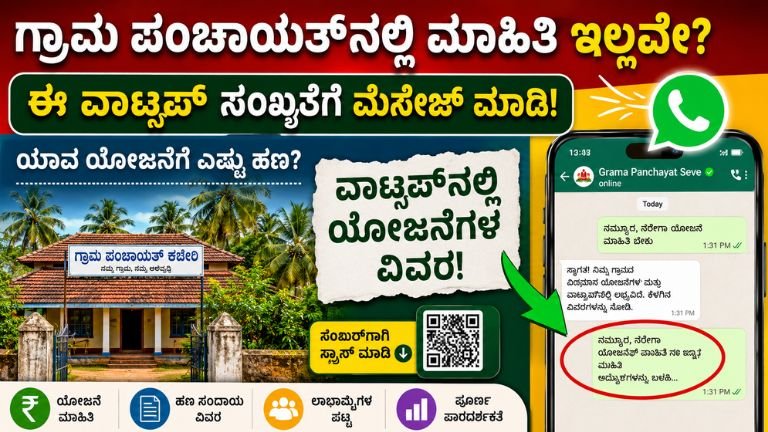
In 2026, under the digital expansion initiatives driven by the Ministry of Panchayati Raj, local governance has moved directly onto our smartphones. Grama Panchayats—particularly across states like Karnataka—are increasingly adopting official WhatsApp helplines to bridge the gap between rural citizens and administrative authorities.
Whether you need to check your eligibility for the Udyogini Loan Scheme, track a Basava Vasati Yojana housing application, or lodge a civic complaint, this comprehensive, step-by-step guide will teach you how to master the Grama Panchayat WhatsApp service like an insider.
Understanding the Grama Panchayat Digital Ecosystem
A Grama Panchayat’s official WhatsApp account acts as a centralized, mobile helpdesk and digital notice board. It is designed to foster transparency, eliminate unnecessary middlemen, and offer direct access to structural village data.
Who Manages the Service?
It is crucial to understand that these accounts are not operated by automated corporate call centers or AI bots. They are managed on the ground by local administrative staff, which typically includes:
-
The Panchayat Development Officer (PDO): The administrative head overseeing village development execution.
-
The Panchayat Secretary: Responsible for maintaining records, village analytics, and official documentation.
-
The Data Entry Operator (DEO): The technical hand who usually updates portals, uploads lists, and handles digital correspondence.
Because the same personnel handle physical paperwork, public meetings, and digital messages, response times are not instantaneous. Treating the platform as an official, asynchronous communication channel ensures realistic expectations and better results.
The Scope of the Service
What can a WhatsApp message actually accomplish? It is vital to separate information gathering from formal processing:
+--------------------------------------------------------+
|                 WHATSAPP CAPABILITIES                  |
+--------------------------------------------------------+
|          CAN DO           |          CANNOT DO         |
+---------------------------+----------------------------+
| * Share scheme circulars  | * Issue official physical  |
| * Send document checklists|   certificates directly    |
| * Provide PDF application | * Process banking or loan  |
|   forms and formats       |   disbursals               |
| * Disseminate beneficiary | * Bypass mandatory state   |
|   and housing lists       |   portal registrations     |
| * Log structural civic    | * Accept personal cash or  |
|   complaints with photos  |   digital fee payments     |
+---------------------------+----------------------------+
Five Verified Ways to Locate Your Official Panchayat WhatsApp Number
Because digital tools can be easily mimicked by bad actors, discovering and verifying the authentic, official contact number for your local Grama Panchayat is your first line of defense. Never trust numbers found randomly on unregulated social media threads. Use these five verified ground methods instead:
Method A: The Physical Notice Board Audit
Every Grama Panchayat office is mandated to display public information. Visit your local office and look directly at the main notice board. The official mobile helpline, the PDO’s official contact number, and the designated WhatsApp grievance number are prominently painted or printed there.
Method B: Direct Verification from Village Professionals
If you cannot travel to the office, consult trusted ground-level workers who interact with the administration daily:
-
ASHA (Accredited Social Health Activist) Workers
-
Anganwadi Supervisors
-
The Village Accountant (VA)
These personnel possess direct channels to the PDO and can provide the active, official helpline number.
Method C: Official District and State Portals
Cross-reference numbers through official institutional websites. Check the Rural Development and Panchayat Raj Department (RDPR) portal of your respective state or your specific District web domain (e.g., Chikkamagaluru.nic.in for regions around Tarikere). Look for the “Directory” or “Panchayat Contacts” section.
Method D: Local Governance Forums (Gram Sabhas)
During statutory Gram Sabha meetings, administrative teams regularly announce new citizen-facing digital initiatives. Attend these assemblies to secure the verified contact data directly from the chair.
Method E: Self-Help Group (SHG) Networks
Women operating within verified federations (such as Sanjeevini or National Rural Livelihoods Mission circles) maintain direct coordination lines with the Panchayat for community funding allocations. Their leadership structures usually hold the verified digital contact sheets.
Protocol for Saving and Verifying the Number
Once the number is obtained, execute the following security protocol before initiating contact:
-
Clear Labeling: Save the contact inside your smartphone using a standardized, unambiguous format. For example:
GP - Tarikere - Official Helpline. This minimizes the risk of accidentally messaging personal numbers or outdated contacts later. -
Logo Identification: Open the contact inside WhatsApp. Authentic profiles generally display the official state emblem or the Ministry of Panchayati Raj logo as their display picture.
-
The Verification Check: If the account utilizes the WhatsApp Business interface, check for an official business description detailing the office location and operating hours.
How to Draft a Professional, High-Response Message
Government officials handle a mountain of paperwork daily, alongside hundreds of incoming chat notifications. A message that reads simply “Hi” or “Sir help me” will quickly sink to the bottom of their queue. To guarantee a swift, accurate response, your message must be structured, respectful, and self-contained.
The Golden Framework for Inquiries
Your message should immediately present who you are, where you live, and precisely what you need.
Standard Template:
Namaskara Sir / Madam,
Name: [Your Full Name]
Village / Hamlet: [Your Village Name]
Ward Number: [Your Local Ward Number]
Contact Number: [Your Mobile Number]
Subject: Inquiry regarding [Name of the Government Scheme, e.g., Udyogini Loan / Borewell Subsidy]
Request: I am looking to understand the exact eligibility criteria and the required document checklist to apply for this scheme. Could you please share the relevant guidelines or application form PDF?
Thank you.
Communication Mistakes to Avoid
-
Voice Note Dependency: Avoid sending long, unstructured voice notes. Text is much easier for an operator to quickly scan and action during office hours.
-
Spam and Media Forwards: Do not send good morning images, religious greetings, or unverified news links to an official government helpline. This can result in your number being blocked.
-
Fragmented Texting: Do not send your request across ten separate messages. Compile all details into one single, cohesive text block.
Maximizing Efficiency: Timings and Response Cycles
Understanding the operational rhythms of local government will prevent unnecessary frustration and help you time your communications perfectly.
The Weekly Availability Matrix
| Day | Priority Level | Response Likelihood | Reason |
| Monday | Low | Delayed | High volume of weekend backlog; intensive internal review meetings. |
| Tuesday – Friday | High | Optimal | Standard administrative days; maximum desk presence for operators. |
| Saturday | Medium | Variable | Half-day operations; focus shifts to field visits and pending clearances. |
| Sunday / Holidays | Zero | None | Office Closed. Automated systems may log messages, but no human review occurs. |
💡 Pro-Tip
Always send your inquiries within the core window of 10:00 AM to 1:00 PM. Messages sent early in the day sit at the top of the queue when the data entry operators log into their systems.
Deep Dive: Core Services Accessible via WhatsApp
The implementation of WhatsApp in rural governance targets specific, high-demand areas. Here is exactly how to leverage the system for different public schemes:
A. Housing & Site Schemes (e.g., Basava Vasati Yojana / PMAY-G)
Instead of waiting for physical papers to be pinned to the office wall, you can text the helpline to track housing benefits.
-
What to ask for: “Please provide the latest approved beneficiary selection list for Housing Scheme – Ward 3.”
-
What you receive: A multi-page PDF document or a clear photograph of the official signed order detailing selected applicants.
B. Women’s Empowerment and Self-Help Group Schemes
The Udyogini Scheme offers subsidized business loans to women micro-entrepreneurs, but navigating the banking tie-ins can be tricky.
-
What to ask for: “Please share the list of partner banks processing Udyogini applications for this financial cycle, along with the family income limit criteria.”
-
What you receive: Clear eligibility details, eliminating unnecessary introductory trips to busy bank branches.
C. Agricultural Subsidies and Infrastructure
Farmers can track allocations for borewell drilling subsidies, solar pump sets, seeds, or crop insurance verification drives.
-
What to ask for: “When is the registration window closing for the Krishi Bhagya scheme components in our village?”
-
What you receive: Crucial deadline dates and the exact location of verification camps.
D. Tracking Public Certificates
While the final, secure digital signature happens on central servers (like Seva Sindhu in Karnataka), the initial field verification is handled locally.
-
What to ask for: “I have applied for an Income/Caste Certificate. My acknowledgement number is [Number]. Has the local field verification report been uploaded?”
-
What you receive: An update on whether your application is approved locally or if a specific document is missing.
The Civic Grievance Framework: Sending Effective Complaints
One of the most effective features of a Panchayat WhatsApp helpline is its use as a civic monitoring tool. If a street light is broken, a public water pipe is leaking, or a drainage line is blocked, you can build a solid case that demands action right from your phone.
The 3-Element Complaint Strategy
A vague complaint like “No water in our area” is incredibly difficult to assign to a maintenance team. Instead, compile a comprehensive report using these three elements:
-
The Visual Evidence: Take a clear, well-lit photo or a brief 10-second video of the exact structural issue.
-
The Absolute Location: Identify landmarks clearly. (e.g., “Opposite the Government Primary School water tank, Ward 2”).
-
The Duration Statement: Specify exactly how long the issue has persisted.
Example Complaint Draft:
To the PDO,
[Attach Image Here]
Location: Main road intersection near Hanuman Temple, Ward 4.
Issue: Public drinking water pipe leakage causing road damage and water wastage.
Duration: The leak has been active for the past 48 hours.
Please assign the maintenance team to resolve this. Thank you.
Cybersecurity, Privacy, and Fraud Prevention
With the convenience of digital governance comes the risk of cyber fraud. Scammers frequently try to mimic government representatives to target rural citizens. Protect your personal information by adhering to these strict security boundaries:
-
The Financial Red Flag: A Grama Panchayat will never ask you to transfer money via UPI, Google Pay, or PhonePe to a personal mobile number. All official government fees must be paid either physically at the cash counter of the Panchayat office against a printed receipt, or via official, secure state payment portals (like Panchatantra).
-
The OTP Shield: No administrative officer needs an Otp (One-Time Password) generated on your phone to check a scheme list or verify your identity. Never share an OTP under any circumstances.
-
Smart Data Sharing: If an official requires your identity details to cross-reference a file, avoid sending full, unmasked photographs of your primary identity cards. If asked to confirm identity details, it is best practice to provide only the last 4 digits of your Aadhaar number to help locate your file safely.
-
Report Bad Actors: If an account bearing a government logo demands personal processing fees or commissions to speed up a loan, save the chat screenshots immediately and file a formal report with your Taluk Panchayat executive office or local cyber crime cell.
Real-World Case Study: Direct Action vs. Middlemen
To see the value of this system in practice, let’s look at a realistic scenario featuring a rural resident named Lakshmi from the Tarikere region:
The Old Way (Pre-Digital)
-
Lakshmi hears a rumor about an open window for the Udyogini Loan Scheme.
-
She spends money on bus fare to travel to the town center, only to find the office closed for a field inspection day.
-
On her second visit, a middleman stops her outside the building, offering to secure the forms and guarantee selection in exchange for a ₹1,500 commission.
-
She loses time, money, and control over her own application process.
The Modern Way (2026 WhatsApp System)
-
Lakshmi locates her verified Grama Panchayat WhatsApp number from the notice board during a routine trip past the village center.
-
She sends a cleanly structured text query from her home on a Tuesday morning.
-
The data entry operator replies the following day with an official, official PDF document listing the exact requirements: bank passbook copies, age proof, and a specific income certificate threshold.
-
Lakshmi gathers her documents calmly, avoids the middleman entirely, visits her local bank branch with confidence, and submits her application successfully.
The Result: Complete financial transparency, zero spent commission, and absolute peace of mind.
watsap Number
Escalation Protocol: What to Do If There Is No Response
What happens if you follow all the rules, send a pristine text message during working hours, and see no reply after several days? Do not panic or spam the chat. Follow this structured escalation path:
[Day 1: Message Sent] ---> Allow 48 Working Hours for Processing
                                │
[Day 3: No Reply]    ---> Send a Polite Follow-up ("Reminder: Application Status Check")
                                │
[Day 5: Still Silent] ---> Visit the Panchayat Office during public hours with the chat open
                                │
[Final Step]          ---> Escalate to the Taluk Panchayat Office if structural issues are ignored
Remember: WhatsApp is a highly effective supplementary tool to make rural administration accessible and efficient. It does not replace the legal, statutory framework of the Panchayat office.
By using the platform smartly, formatting your requests professionally, and keeping your personal data secure, you can skip the long queues and let your smartphone do the walking. Welcome to a smarter, more connected, and highly empowered rural India in 2026!